

Deployment and operations
Last updated:
Lazurio can run on your computer or in a hosted Environment. The operator manages the installed product, working copies and modules. Start by listing the machines, repositories, AI tools, model providers and connected services you will use. Name an owner for each.
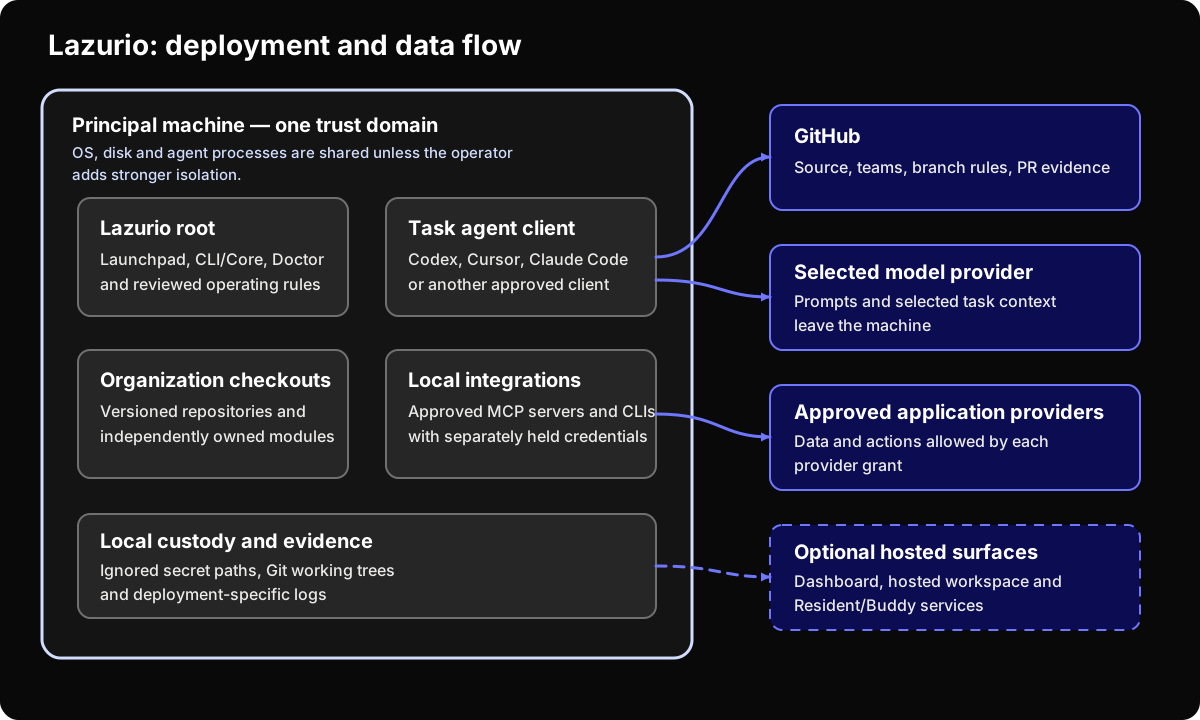
Current and target state
Section titled “Current and target state”The baseline is Platform v0.1.14, released on 27 October 2026. Check the installed version and enabled services before applying the instructions.
| Surface | Available behavior | What to verify |
|---|---|---|
| Installed CLI and Apps | One released program, with diagnostics and generated agent instructions. | Supported OS and architecture, release verification and startup. |
| Organization repositories and modules | Separate versioned content; clean declared checkouts can be synchronized. | Repository grants, declared modules, build and data-migration requirements. |
| Local listeners | Apps and modules can listen on loopback. Loopback listeners are not caller authentication. | Hosted entry or local access controls for the concrete deployment. |
| Account, hosted services and Buddy | Separate services with their own availability. | Operator, identity, network, storage and service terms. |
The installed product does not require a Platform source checkout for daily work.
Rollout sequence
Section titled “Rollout sequence”1. Define the Organization
Section titled “1. Define the Organization”Name its GitHub organization, repositories, teams, administrators and offboarding owner. State what company data belongs there and what is excluded.
2. Approve the machine boundary
Section titled “2. Approve the machine boundary”Document ownership, encryption, patching, endpoint monitoring, local backup, remote wipe and incident handling. The recommended starting point is one Organization per machine. A multi-Organization machine is an accepted exception inside one shared trust domain, not hard tenant isolation. Keep its provider sessions separately named and revocable.
3. Select the agent and model providers
Section titled “3. Select the agent and model providers”Record the client, model provider, account type, authentication, data handling, retention, telemetry and contractual owner. Repeat the review when the client or account tier changes.
4. Enable only the required context
Section titled “4. Enable only the required context”Begin with one bounded use case. Grant only the repositories and provider scopes it needs, follow the external application standard, and test revocation.
5. Enforce publication
Section titled “5. Enforce publication”Set branch rules, checks and reviewers for repository changes. For messages, infrastructure, billing, secrets and destructive actions, name the real provider-side permission or confirmation. Where none exists, mark the rule as process-only.
6. Exercise the rollout
Section titled “6. Exercise the rollout”Prove the normal task, a repository denial, the client’s local filesystem boundary, credential revocation, failed CI, rollback, offboarding and incident escalation. Keep the evidence with the approval decision.
Updates, rollback and ownership
Section titled “Updates, rollback and ownership”Use lazurio update for the installed product and current declared content.
It synchronizes clean primary checkouts first, obtains the Bun version moved
modules pin, builds what changed and then updates Lazurio. The parts report
separately: failure of one does not prove failure or success of the others.
Dirty repositories are left intact. lazurio organization sync runs the content
synchronization explicitly; the product’s background content sync does not
silently update the product itself.
Product updates move forward. A failed preparation preserves the active
version; after activation there is no lazurio update rollback. If Apps cannot
start normally, use Recovery mode
and the diagnosed repair or a newer release. Returning a module’s source or
its deployment to a verified revision is a separate, module-owned procedure;
it must not restore revoked credentials or obsolete access.
Before production use, close the remaining deployment-specific questions:
- Who maintains machines, GitHub teams, dependencies and integrations?
- Where do services run, and which networks can reach them?
- Which logs exist, how long are they retained and who handles incidents?
- How are local data and credentials backed up, deleted and recovered?
- Which components are stable, experimental, optional or target-only?
- Who provides support, and what response time—if any—is promised?
Keep the answers with the deployment approval. See the content-sync contract for exactly which repositories and operations are included.